
Microstock Button
Lee Torrens on twitter (@microstock) has reported a new nice service called Microstock Button.
Microstock Button is a service for authors who sell their work at microstocks. Microstock Button allows you to place your referral and portfolio links on websites, blogs, email, social networks. Each transition on the link to the portfolio is monitored and presented in a user-friendly report. Links can be presented as a button (very similar to the famous social network buttons, such as “ Add This” or “Add to Any”) , a set of buttons or a list of links. One of the developer, Olena Kucherenko aka Nanka:
“we still have plans to develop the service and any suggestions will be considered in the further development of the service. Just want to thank all the people who have sent feedback to our service”
Configuration
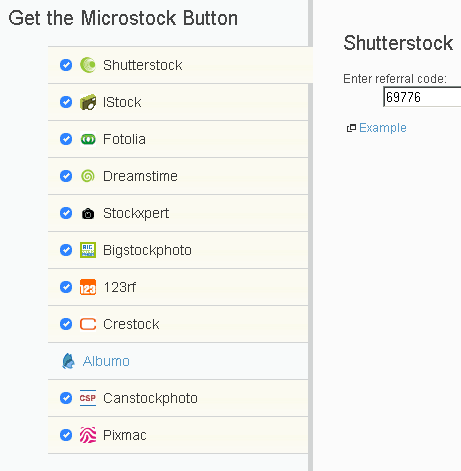
You have to join and configure all your microstock agencies referral code / username.
Get the code
Then you can choose the button typology and get the code. Here some examples:
– Drop-down menu button (pass the mouse over)
– Links For Buyers and Sellers
Buy My Stock Images:
– List of Links
Buy My Stock Images:
- Microstock Button
- Shutterstock
- Istock
- Fotolia
- Dreamstime
- Stockxpert
- Bigstockphoto
- 123rf
- Crestock
- Canstockphoto
- Pixmac
Sell Your Stock Images:
- Microstock Button
- Shutterstock
- Istock
- Dreamstime
- Stockxpert
- Bigstockphoto
- 123rf
- Crestock
- Canstockphoto
- Pixmac
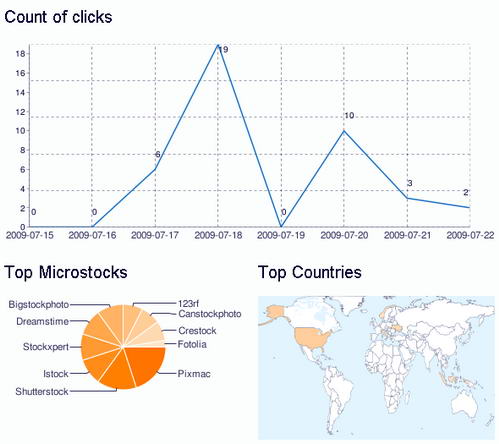
Analytics
A screenshot of the analytics section with clicks counter, top microstock sites and top countries.

14 Comments
Thats a real cool tool! I had seen it on a blog a coupe of days ago and found it really interesting!
very nice i have done it now! 🙂
I'm also testing this feature. Let's see how efficient it is…
I would love to see this offered for Macro RM/RF agencies as well as Micro it would be a great promotional tool for my company. Many of us are represented in both markets. Thanks for your hard work and great effort.
Best,
Jonathan Ross
Hi Jonathan,
yes it would be a good thing! I think it's a question of numbers, microstock let a great number of amateur/semi-pro/part-time photographers enter into the market. How many i.e. shutterstock or fotolia contributors are present for a Getty or Blend pro one?
Cheers,
roberto
This is sweet – I gotta try this out. Very clean – you don't even need a million links all over your site.
Yes Todd, I like the discreet drop-down menu button
<script src="http://microstockbutton.com/js/mb.js" type="text/javascript"></script><script type="text/javascript">
var mb_user = 5;
var mb_sell = [ 'Shutterstock','Istock','Dreamstime','Stockxpert','Bigstockphoto','123rf','Crestock','Canstockphoto','Pixmac'];
var mb_buy = ['Shutterstock','Istock','Fotolia','Dreamstime','Stockxpert','Bigstockphoto','123rf','Crestock','Canstockphoto','Pixmac'];
var mb_url = 'http://microstockbutton.com/';
var mb_button_5 = new MB(mb_user, mb_sell, mb_buy, mb_url);
</script><a onmouseover="mb_button_5.showTip(this);" onmouseout="mb_button_5.hideTip()" href="http://microstockbutton.com/click/?user=5" target="_blank"><img src="http://microstockbutton.com/i/buttons/1.gif" title="Microstock Button – all microstocks in one button" alt="Microstock Button – all microstocks in one button" border="0">
Yes Todd, I like the drop-down menu button
Hey guys,
loved all your posts and ideas. always a fan. Recently came across the website http://www.isyndica.com , it does what this tool does but only with a lot more supported channels, it looks like a great tool that would help me save a lot of time that i waste on uploading to different sites (and also saves me from, getting bitched by my roommate about the internet speed) But i was never aware of a sit like this, and none of my friends can say anything about the site, so i come to u guys who have helped me a lot since i took photography as a hobby.
This website supports all channels mentioned in your post. and it will be nice if u guys could tell me more about how it could benefit me. AS it is a fairly new concept i guess u guys will be also interested in having a look at it. Expect to hear from u, or see a post soon. Thanking you in advance.
love u all
Alyssa
alyssawarsen@yahoo.com
Hi Alyssa, just check the "isyndica" category on this site and you will know all details, features, news about the isyndica distribution and analytics service: http://www.mystockphoto.org/category/tools/isyndi…
Cheers
My recent post Shutterstock Announces Search Upgrades, Including Real-Time Search
This post from Alyssa looks remarkably one on my blog that I just marked as spam. Its not a good look if Isyndica is indeed spamming comments.
My recent post Night Shootout: Panasonic GF1 vs Canon 5D Mk II
Thanks Holgs… actually not a clean comment but I know isyndica since the beginning and they are not spammers.
Cheers,
Roberto